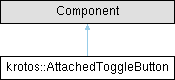
This class combines a ToggleButton, Label, and a ButtonParameterAttachment to simplify the process of adding toggle buttons to a GUI element.
More...
#include <AttachedToggleButton.h>
This class combines a ToggleButton, Label, and a ButtonParameterAttachment to simplify the process of adding toggle buttons to a GUI element.
◆ AttachedToggleButton()
| krotos::AttachedToggleButton::AttachedToggleButton |
( |
const String & | labelText | ) |
|
Constructs a new slider with specified text for the label.
◆ getAttachment()
| std::unique_ptr< ButtonParameterAttachment > & krotos::AttachedToggleButton::getAttachment |
( |
| ) |
|
Returns reference to the attachment Object.
◆ getButton()
| Button & krotos::AttachedToggleButton::getButton |
( |
| ) |
|
Returns reference to the button Object.
◆ getControlComponent()
| Button & krotos::AttachedToggleButton::getControlComponent |
( |
| ) |
|
◆ getLabel()
| Label & krotos::AttachedToggleButton::getLabel |
( |
| ) |
|
Returns reference to the label displaying the button name.
◆ resized()
| void krotos::AttachedToggleButton::resized |
( |
| ) |
|
|
override |
◆ setDragAndDropDescription()
| void krotos::AttachedToggleButton::setDragAndDropDescription |
( |
const var & | description | ) |
|
Set the descriptor for the Label which will be passed to a dragAndDropTarget. Setting this will enable the Label to become draggable
◆ m_attachment
| std::unique_ptr<ButtonParameterAttachment> krotos::AttachedToggleButton::m_attachment |
|
private |
◆ m_label
◆ m_toggleButton
| ToggleButton krotos::AttachedToggleButton::m_toggleButton |
|
private |
◆ onStateChange
| std::function<void()> krotos::AttachedToggleButton::onStateChange |
You can assign a lambda to this callback object to have it called when the button's state changes.
The documentation for this class was generated from the following files: